- Hardware Overview: Apple TV 4K and Amazon Fire TV Cube
- Operating Systems and App Stores
- Performance, Storage, and 4K Support
- Device Comparison Table
- Choosing the Right Legal IPTV Device for Your Home
- Connectivity, Ports, and Remote Controls
- Audio Integration and Surround Sound Considerations
- Pros and Cons
- Setup Guidance and Compatibility
- Legal Advice for UK Viewers
- Frequently Asked Questions
- Do these devices require a TV Licence in the UK?
- Can I use my existing TV remote with Apple TV?
- Does the Fire TV Cube support all UK catch-up apps?
- Which device has a better user interface?
- Is an Ethernet cable necessary?
- Can I pair Bluetooth headphones?
Picking a high-performing legal IPTV device changes how you watch television at home. Two top-tier options dominate the UK market right now: the Apple TV 4K and the Amazon Fire TV Cube. Both media players run official applications from broadcasters like the BBC, ITV, and Sky, delivering live channels and on-demand content smoothly over broadband.

If you want a fast, reliable setup, understanding how these two pieces of hardware compare matters. They handle apps, voice commands, and network connections differently. Let’s break down their key features.
Hardware Overview: Apple TV 4K and Amazon Fire TV Cube
Hardware power dictates how quickly your menus load and how smoothly live streams play. The Apple TV 4K runs on the A15 Bionic chip. It feels lightning-fast. Menus glide without stuttering, and channel switching happens instantly. Apple offers two versions: a Wi-Fi-only model with 64GB of storage, and a Wi-Fi plus Ethernet model with 128GB and Thread smart home support.
Amazon’s Fire TV Cube uses an octa-core processor paired with 2GB of RAM and 16GB of storage. It handles 4K Ultra HD playback effortlessly. It also includes an Ethernet port right out of the box, which helps if your living room Wi-Fi drops packets during peak evening hours.
Operating Systems and App Stores
tvOS powers the Apple ecosystem. It’s clean, ad-free on the home screen, and prioritizes your content over sponsored rows. You’ll find all major UK catch-up apps alongside official provider apps in the App Store. Privacy controls are strict here too.
Fire OS runs on Amazon’s cube. It integrates deeply with Prime Video and Alexa. The interface features more sponsored recommendations than Apple’s setup. Still, the Amazon Appstore hosts every major UK TV network application you need for official streaming.
Performance, Storage, and 4K Support
Both players support Dolby Vision, HDR10+, and Dolby Atmos audio. Your movies and sports look crisp if your TV handles those formats. Apple’s extra storage space on the higher-end model lets you cache offline media and load heavier apps without worry. Amazon’s 16GB limit works fine for pure streaming, but it fills up faster if you download games.
Device Comparison Table
| Feature | Apple TV 4K (2022) | Amazon Fire TV Cube (3rd Gen) |
|---|---|---|
| Operating System | tvOS | Fire OS (Android based) |
| Processor | A15 Bionic | Octa-core 2.0 GHz / 2.2 GHz |
| Storage | 64GB or 128GB | 16GB |
| Ethernet Port | Model dependent (128GB version) | Built-in gigabit port |
| Wi-Fi Standard | Wi-Fi 6 | Wi-Fi 6E |
| Voice Control | Siri | Alexa (hands-free) |
Choosing the Right Legal IPTV Device for Your Home
Deciding between these units comes down to your existing tech setup and budget. Prices in the UK generally see the Apple TV 4K starting around £149, while the Fire TV Cube retails closer to £139. If you already own an iPhone or iPad, Apple TV makes a lot of sense. AirPlay integration works flawlessly.
If you prefer hands-free voice control and smart home gear integration, Amazon wins. You can ask Alexa to turn on the TV without touching a remote. Both units deliver excellent video quality for your official broadcaster apps.
Connectivity, Ports, and Remote Controls
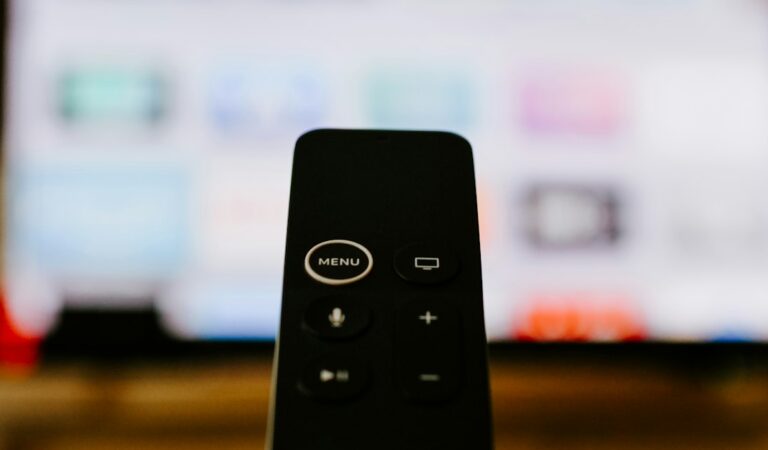
Ethernet connections beat Wi-Fi for live television. Wired setups stop buffering before it starts. The Apple TV remote charges via USB-C and features a touch-enabled clickpad. Amazon’s backlit Alexa Voice Remote Enhanced feels comfortable in the hand and offers dedicated app buttons.
Audio Integration and Surround Sound Considerations
When building a modern entertainment center for live TV and high-definition streaming, audio performance is just as crucial as visual clarity. Both the Apple TV 4K and the Amazon Fire TV Cube excel in this area, but they integrate into home theater setups differently. The Apple TV 4K shines if you are deeply entrenched in the Apple ecosystem, offering seamless audio sharing to multiple pairs of AirPods or Beats headphones—ideal for late-night viewing without disturbing others in the household. Furthermore, its handling of Dolby Atmos spatial audio creates an immersive soundscape when paired with compatible soundbars or multi-channel AV receivers. On the other hand, the Amazon Fire TV Cube functions as an independent smart speaker array. Because it features built-in microphones and far-field voice recognition, it can output audio and respond to Alexa commands even when your television is completely powered off. This dual-purpose functionality allows the Fire Cube to act as an audio hub for playing music via Amazon Music, Spotify, or tuned-in radio stations without needing to turn on your primary display. Evaluating how these audio capabilities complement your existing sound system will help ensure your living room delivers a genuinely cinematic experience.
Pros and Cons
- Apple TV 4K Pros: No home screen ads, extremely fast processor, great privacy features.
- Apple TV 4K Cons: Higher price tag, Ethernet port restricted to the expensive model.
- Fire TV Cube Pros: Hands-free Alexa support, built-in Ethernet port, great Wi-Fi 6E speeds.
- Fire TV Cube Cons: Busy user interface with heavy sponsored content.
Setup Guidance and Compatibility
Plug either device into an HDMI port on your television. Connect power. Follow the on-screen prompts to link your Wi-Fi or plug in your Ethernet cable. Download your chosen broadcaster apps from the official device store. Always check the provider’s official compatibility page to confirm their app runs on your chosen hardware version before buying.
Legal Advice for UK Viewers
IPTV technology simply streams television data over internet lines. Legality depends entirely on who owns the broadcast rights. Stick to official applications downloaded from verified app stores. Never use modified APK files or unauthorized streaming links.
Frequently Asked Questions
Do these devices require a TV Licence in the UK?
Yes. Watching live television broadcasts or BBC iPlayer on any device requires a valid UK TV Licence.
Can I use my existing TV remote with Apple TV?
Most modern televisions support HDMI-CEC, meaning your main TV remote can control basic Apple TV menu movements.
Does the Fire TV Cube support all UK catch-up apps?
Yes, BBC iPlayer, ITVX, Channel 4, and My5 are fully supported on Amazon’s app store.
Which device has a better user interface?
Apple TV 4K offers an ad-free experience, whereas the Fire TV Cube displays promotional banners on the home screen.
Is an Ethernet cable necessary?
Strong Wi-Fi works well, but an Ethernet cable provides a more stable connection for live sports streams.
Can I pair Bluetooth headphones?
Both devices support Bluetooth audio pairing for private listening.
For more information, iptv.
Related reading
- Firestick vs Samsung TV IPTV Apps: Fixing Buffering and Freezing
- Understanding How IPTV UK Services Deliver Television Over Broadband
Update: How to Fix IPTV Buffering on Firestick and Smart TVs in the UK